Deployment & connectivity

Use ChemQuery directly—or connect it to agentic workflows.

Both paths use the same backend, data, and guardrails. A REST agent API and a downloadable agent skill are also available.

01 · Standalone app

Interactive exploration

  • Chat workspace in the browser
  • Google sign-in, or IAP where configured
  • Interactive grids, charts, and structure renderings
  • Interactive spreadsheet for viewing and filtering tables with millions of rows
  • Save, filter, and export result tables
02 · MCP server

Agent and tool workflows

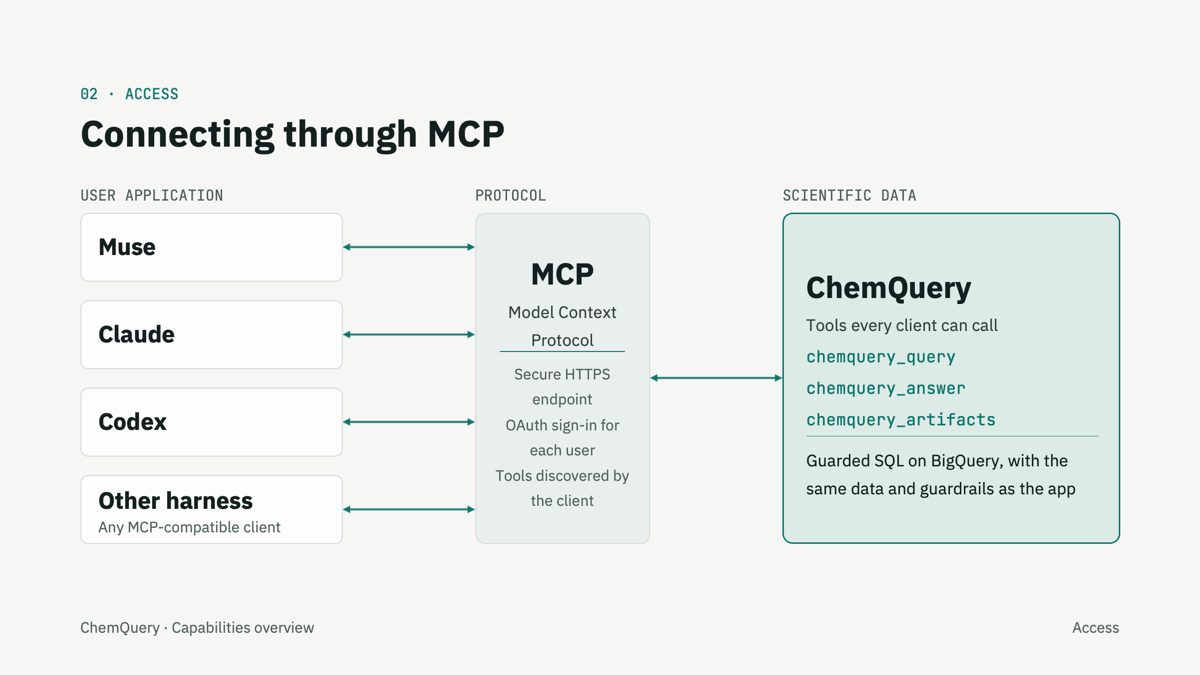
  • A hosted endpoint for each organization
  • OAuth sign-in for every user
  • Typed tools that MCP clients discover
  • Results flow into the client’s own analysis
Standalone app

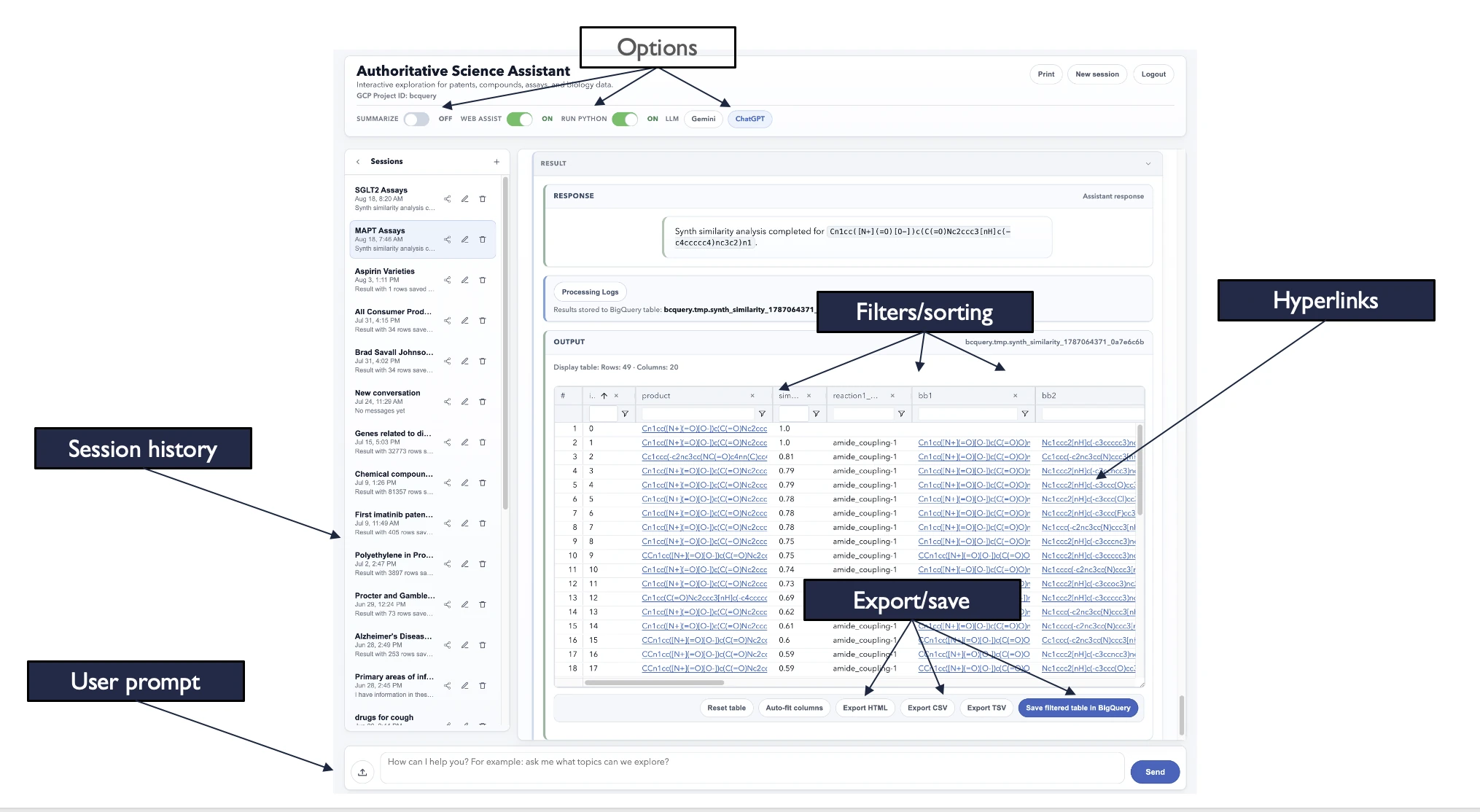
Standalone app interface

Annotated ChemQuery standalone application interface
OptionsSummarize, web assist, Python, and LLM choice
Session historySaved sessions you can reopen
User promptAsk in plain language
Filters and sortingPer-column filters and sorting
HyperlinksLinked values in the results
Export and saveHTML, CSV, TSV, or save to BigQuery
MCP server

Connecting through MCP

Any MCP-compatible application can use ChemQuery as a tool. Each organization gets its own hosted MCP address, and each user signs in with OAuth before calling tools.

Connecting through MCP: user applications Muse, Claude, Codex, and other harnesses connect through the Model Context Protocol, with a secure HTTPS endpoint and OAuth sign-in, to ChemQuery tools (chemquery_query, chemquery_answer, chemquery_artifacts) running guarded SQL on BigQuery
User applications connect through MCP to the ChemQuery tools. Click to enlarge.

Specific integration compatibility should be confirmed for each environment.

Analysis beyond SQL

Python, RDKit, and chemical structure tools

Python and charts

  • Sequential SQL and Python workflows
  • Overlap analysis and Venn counts across result sets
  • Plotly, Matplotlib, and Seaborn charts
  • Sandboxed execution on query results

RDKit on your results

  • Runs inside the sandboxed Python environment
  • Parses and normalizes SMILES and InChI
  • Computes InChIKeys and other identifiers from structures
  • Renders single structures and structure grids
  • Powers the structure audit, from descriptors to 3D shape

Chemical structures

  • Similarity searches
  • Single-step retrosynthesis
  • Validation, identifiers, and standardization
  • Descriptors, drug-likeness, and developability screens
  • Alerts: PAINS, Brenk, NIH, ZINC, ChEMBL
  • Scaffolds, fingerprints, optional 3D shape
  • Exports to CSV, JSON, SDF, and Excel

Audit results are deterministic screening outputs, not experimental ADMET, safety, or efficacy evidence.